How to use the Circlemark search: every filter, column and mark, from the maturity window to the Monday email
A walkthrough of the signed-in search page for New York City and Texas: how the maturity window reads a stated date against an estimate, what each property-type, lender and borrower control matches, the New York-only co-op and rent-regulation filters, how to read a row's badges and the score, the map, and what Save search, Export CSV and the watchlist do on each plan — with the guide behind each control linked where the record itself is the question.
By Andrew Zhong, founder of Circlemark · · 14 min read · Figures as of Oct 22, 2026
The search page is one grid over every active commercial mortgage recorded in New York City, Dallas–Fort Worth, Houston, Austin and San Antonio, and twenty-odd controls for cutting it down to the loans a desk should call this quarter. Each control matches something specific in the county record, and the row that comes back marks where each fact came from. This walks the bar left to right, then the row, the map, and what Save search, Export CSV and the star do on each plan.
Each step links the guide that explains the record behind it. If the question is what a maturity date in the public record even is, start with where maturity data comes from; if it is how to find every maturing loan in a market by any tool, that guide comes first. For one building, the free lookup needs no account. This is the rest.
Step 1 — the market and the window
Open Loans in the app. The bar's first row sets the market: Metro is one of the five, County any set of its counties (New York is the four ACRIS boroughs; Staten Island has its own recorder and is not covered). The count under the heading, "1,000+ loans matching", tracks every change once you press Apply; Metro, Template and Score apply on their own.
The control that does most of the work is Maturing from … to. It takes months from today, rolling — "3 mo" to "12 mo" means the same window next Monday, which is what makes a saved search worth saving — and the ladder runs from "2 yrs past due" to "5 yrs" out. An "exact dates" link switches to a date pair when a quarter-end matters.
What the window matches is the point of the product, so it is worth stating exactly:
- A window in the future matches a loan's stated maturity where the document states one; otherwise its estimate, or any of the plausible terms where the estimate is a spread (3, 5, 7 or 10 years, by lender type); and a stated rate reset on a long-dated note. A loan with no date at all — a 1–4 family mortgage with nothing stated — drops out as soon as a window is set.
- A window entirely in the past matches only dates read from the document. No estimate ever matches a past window, because an estimate that has lapsed says the assumed term was wrong, not that the loan is late. What comes back is loans whose stated maturity has passed with no satisfaction or release on file, which is the list the past-maturity guide is about.
- Stated dates only, the checkbox under the bar, drops every estimate from any window. In New York that removes most of the market, because the consolidation agreement that refinances a New York loan almost never states a maturity; in Texas it keeps about two deeds of trust in five.
Here is New York, multifamily, three to twelve months out, as the page returns it.
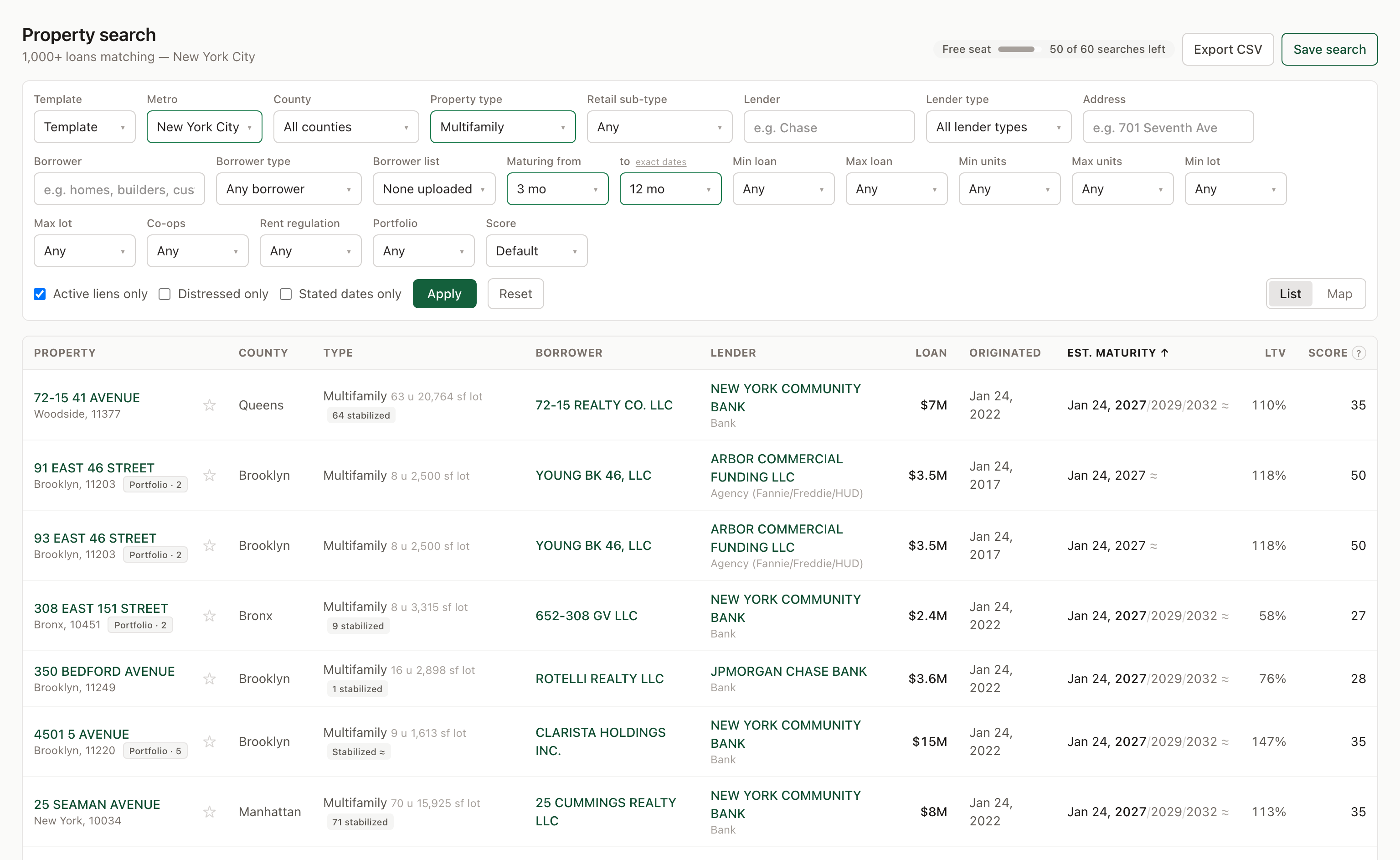 New York, multifamily, maturing in 3–12 months, on a free seat. Every maturity in view carries a ≈: these are 2022 bank notes whose consolidation agreements state no date, so the cell shows the plausible terms — 5, 7 and 10 years — with the headline year in bold. The 2017 Arbor loans show one year because an agency loan's term is not in doubt.
Step 2 — the collateral
Property type is a multi-select over the assessor's classification: Residential 1–4 Units, Multifamily, Mixed Use, Office, Retail, Industrial, Lodging, Self Storage, Health Care, Land, Parking, Commercial (general), Special Purpose, Other. Each option carries a one-line description of what the county files under it. Two things to know:
- In New York and in Dallas and Collin counties the type is the district's own code. In Denton and Tarrant, whose rolls publish no building class, it is ours — read from the businesses on record at the address and the district's description — and the row says so with a ≈ beside the type. How those estimates are made, and why they are never quoted as coverage, is its own post.
- With no type picked, the grid hides loans on single 1–4 family houses and keeps blanket loans over three or more. In New York a line under the bar says how many house loans also match and offers to include them; their maturity is a 30-year note's, and the event on them is the rate reset, not the balloon.
Retail sub-type appears beside it in the markets whose rolls carry one — Gas station, Convenience store, Car wash — and only inside Retail. New York's come from the Department of Finance classes (G3, G4, G5 and GW), Dallas from the appraisal district's description, Collin from the roll's business name; Tarrant and Denton estimate them with the type. Houston, Austin and San Antonio publish no class, so the control is not shown there. The gas station, convenience store and car wash post is this control run across both markets: 864 loans, who wrote them and when they come due.
Min and Max loan take a ladder from $500K to $100M or a typed figure ("750k" works). Min and Max units are residential units from the assessor; Min and Max lot is land area — acres in Texas, square feet in New York — and both exclude properties the roll has no figure for. A Texas broker's "ten acres" is the lot; a New York broker's "square feet" is usually the building, which is on the record page, not in the bar.
Portfolio keeps only loans secured by more than one parcel — 2+, 5+, 10+ or 25+ — the blanket mortgages and portfolio loans that one guide covers. The count is parcels under the same recorded mortgage.
Step 3 — the lender
Lender is a text box and a substring: "Chase" finds every spelling the record uses for the bank, and the row's lender cell shows the type underneath. Arriving from a lender's own page — the "who lends on deals like this" links — turns the box into a chip for exactly that institution, every spelling included, and the chip says so on hover.
Lender type is the classification we derive from the name: Bank, Debt fund / private, CMBS, Agency (Fannie/Freddie/HUD), Credit union, Life company / insurer, Public / subsidy, Residential mortgage banker, Other / unclassified. It is the filter behind the only honest rate proxy the record offers: a loan from a debt fund is paying private-money rates whether or not the deed states them. Who lends in New York and who lends in Texas are counted from the same field.
Step 4 — the borrower
Three controls, from crude to exact.
Borrower takes keywords, separated by commas, any of them: homes, builders, custom returns every loan whose borrower on the recorded instrument or owner of record at the assessor carries one of those words. One name with no comma is a plain name search. Clicking a borrower in any row turns the box into a chip for exactly that entity — every loan recorded to that name whether the clerk typed LLC, L.L.C. or nothing after it.
Borrower type is who the borrower is. In Texas it is the line of business the entity filed with the Comptroller, a record; elsewhere, and for Texas entities that filed nothing useful, a word in the name, marked ≈. The options are Home builder, Land developer, Contractor, Hospitality, Health care, Religious / nonprofit, Lender / financial, Public body, and in Texas three more the register alone can answer. Most single-asset LLCs say nothing and carry no type; absence means "cannot say", never "not a builder". The builder tutorial works this control through 1,456 Dallas–Fort Worth loans.
Borrower list matches loans to a roster you upload — a builders' association directory, a CRM export — under Saved → Borrower lists. A firm matches loans recorded to its name in any legal form; a person matches loans whose public record names them: the Comptroller's officers, the deed's signer, the owner of record. That second route is what reaches the project LLC no directory lists.
Address matches the address or the property name, and lifts the 1–4 family hide for the building it names.
Step 5 — New York only: co-ops and rent regulation
Two controls appear only with New York chosen, because only New York's record can answer them.
Co-ops keeps or excludes cooperative apartment buildings, where the loan is the co-op corporation's underlying mortgage rather than a rental building's. A co-op is a Department of Finance building class (C6, C8, CC, D0, D4, DC, H7) or a borrower filing as an Owners, Tenants or Apartments Corp — never the word "co-op" in a name, which Co-op City would match.
Rent regulation has three settings. Registered units keeps buildings whose owner registered stabilized units on the Department of Finance tax bill, and the row carries the count — "64 stabilized". Registered or likely adds our presumption from the building's age and size (built before 1974, six or more residential units, in a residential class), shown as "Stabilized ≈". Not regulated is where neither test fires, which includes buildings that cannot be tested, so it is never "market rate". The bill lags about a year. The rent-stabilized loans post is what this control found.
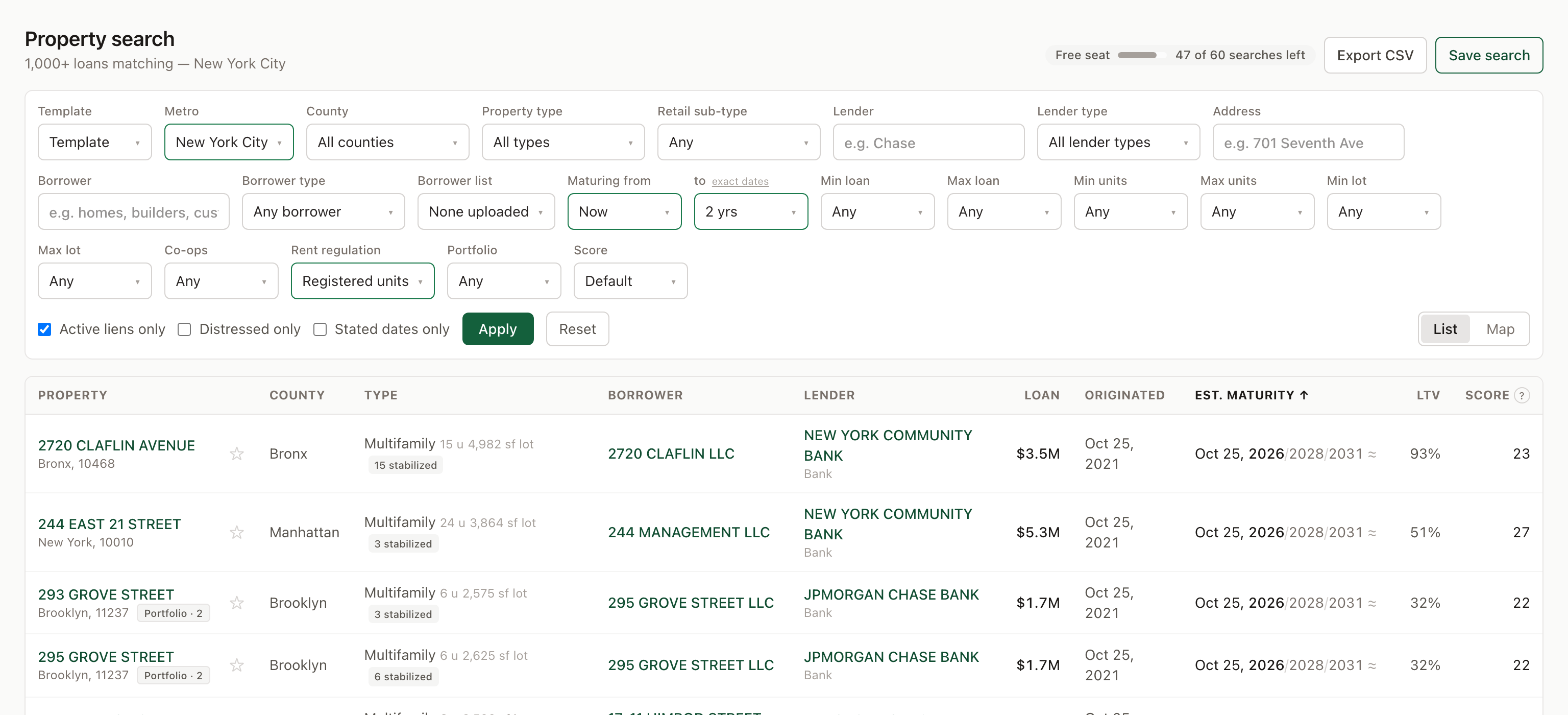 Rent regulation set to Registered units, maturing within two years. The chip under each type is the stabilized-unit count off the tax bill; a "Stabilized ≈" chip would be the presumption instead. Co-ops sits beside it.
Step 6 — read the row
The columns are Property, County, Type, Borrower, Lender, Loan, Originated, Est. maturity, LTV and Score. Loan, Originated, Est. maturity, LTV and Score sort on click. The default order is upcoming first, then stated maturities that have passed with no payoff, then lapsed estimates; 25 rows a page, and the grid stops at 1,000 — narrow the filters rather than page past it.
The property cell carries the badges: Portfolio · N for a blanket loan (one loan, N parcels — never sum it); Revolving line, Corporate credit facility and Syndicated facility for deeds securing a company's line rather than a project loan, each badge explaining itself on hover; Distressed or Watch where a recorder-side signal is on file, with the signals listed; Modified where a later instrument superseded the terms; Foreclosed and Satisfied when Active liens only is off. The ☆ is the watchlist.
The type cell carries the ≈ where the type is estimated, the unit count and the lot, the Co-op chip and the stabilized chip, and the retail sub-type after a dot. The borrower cell links to that borrower's loans and carries the segment chip, "Home builder" or "Home builder ≈", which says on hover whether it came from the register or the name.
Est. maturity is the column to read slowly. A date in bold with no mark was read from the recorded instrument. A date with ≈ is modelled, and where the row shows "Jan 24, 2027/2029/2032 ≈" it is showing the plausible terms for that lender type with the headline year in bold, not pretending to one. "rate reset" is the first rate-change date read from a long-dated note's rider — on New York bank paper the refinancing event. "past term · no payoff recorded" under a stated date is exactly that, and what it usually means is a guide of its own.
LTV is the loan over the assessor's market value, an estimate from a roll and never an appraisal. It is sound only where every parcel under the loan was resolved, so it is blank on multi-parcel loans in Dallas–Fort Worth and on facility members everywhere, and a high figure on a single parcel is not a data error.
Score is a 0–100 default ordering from fields you can see, re-stamped nightly: timing up to 40, certainty 20, size 15, signals 10, as a share of 85. Property type is not scored; filter for it. Hover any score for that loan's own breakdown, and the ? beside the header opens the method. The Score picker in the bar swaps the model — Rescue & distress weights the signals, Size-neutral drops the size — and sorts by it. Template above the bar fills in the filters a desk starts from: Bank refi (12–24 months, stated dates only), Rescue & pref equity (two years past due to a year out, rescue score), Small balance · non-bank (under $10M, debt fund and unclassified lenders, size-neutral), Bridge-to-perm takeout (debt funds, 18 months), Lender intake (6–12 months). Change anything afterwards; the template stays named only while the filters still match it.
Step 7 — the map
Map, at the right of the bar, puts the same results on a map beside the list: clustered points that zoom on click, a popup with the address, type, loan, lender and the maturity — marked ≈ where estimated — and an amber ring on the point whose row you hover. Tick Search as I move the map and the list follows the viewport, so a submarket is a box drawn by panning rather than a county. A load draws up to 2,500 points and shows popup detail at 300 or fewer, so zoom in for the lender; each load counts on the meter.
Step 8 — open the record
A row's address opens the property as a panel over the list, and as a full page in a new tab. Its parts, in order:
- The facts strip: lender, loan, type (with its basis where estimated), the maturity under the heading it earns — Stated maturity, Rate resets or Est. maturity — the stated rate where the document has one, the estimated LTV and the score.
- Owner contacts: who is behind the borrower, from the public record, each name citing its source — the HPD registration, the DOB filing, the Comptroller's officer list, the signature page. Before anything is unlocked the card says how many people the record names and which filing named each; one credit unlocks the names, firms and addresses for that property and looks for a work email. New York and Texas each have a guide to what those sources hold.
- Property: year built, units, building and lot size, the land-use code, rent regulation, the owner of record, assessed value, last sale, street view and a map.
- Who lends on deals like this: the lenders with recorded closings on comparable collateral in this market, with the last one dated — revealed appetite from recorded liens, never a credit box.
- One card per recorded mortgage: the document type and date, the status, the Stated maturity or Maturity estimated (term assumed) pill, and Terms read from recorded document ↗, which opens the page of the scan the clause was read from. How to read that page is the companion guide. Below: distress signals on file, the other properties under the same loan, and the identifiers.
Step 9 — save the search
Save search names the current filters and, with Email me weekly ticked, sends what changed every Monday at 7:00 AM Eastern, after the week's recordings are in: the loans that entered the criteria and status changes on loans you have seen. Quiet weeks send nothing. Because the window is relative, the search means the same thing every week. Saved searches live under Saved, with each one's match count and last digest, and a switcher on the search page jumps between them. The free seat keeps one; Data ten; Data + Outreach twenty-five.
Step 10 — export, watch, and the meter
Export CSV writes the current result as a file named for the market and the day: 33 columns, including a maturity_source column that says stated or estimated per row so the ≈ survives the spreadsheet, and a revealed_contacts column that carries only the contacts this seat has already unlocked. The free seat's files are 40 rows and it has five of them for life; a paid seat's are 200 rows, 50 or 100 a month.
☆ on any row or record pins it to the Watchlist, a page of the properties you are working with their lender, loan, maturity and status: 10 on the free seat, 200 on Data, 500 on Data + Outreach.
The meter. The free seat is a budget, not a plan: 60 search pages, 60 property views and 60 map loads for the life of the seat, counted down by the badge beside the buttons, plus 10 contact reveals. Only pages served count — an empty result costs nothing. A paid seat has 150 searches and property views a day as a scrape guard, 100 or 300 reveals a month, and the exports above; pricing has the rest. The public list builder runs the maturity window without any seat at all, which is the right door for a prospect who wants to see one market before signing up.
Where it stops
The search finds what the county recorded and nothing it did not. A loan paid off whose release was never filed is still active here until a later lien on the lot says otherwise. A maturity the instrument does not state is an estimate however it is filtered. A borrower whose LLC filed nothing with any register carries no type. And no column shows a rate the document does not state: the lender type is the proxy, and it is labelled as one. Where a control cannot answer, the honest result is "cannot say", and the grid is built to show that rather than fill it.
Frequently asked questions
- What does ≈ mean in the maturity column?
- The document states no maturity, so the date is modelled from the origination date and the conventional term for that kind of lender. Where the row shows two or three years, it is showing the plausible terms rather than pretending to one. A date in bold with no mark was read from the recorded instrument, and the record page links the page it came from. Tick Stated dates only to drop every estimate.
- Why does a past-due maturity window return fewer loans?
- A window entirely in the past matches only dates read from the recorded document or a securitization filing — a stated maturity, or a stated rate reset. Estimates never match a past window, because a lapsed estimate says the assumed term was wrong, not that the loan is late. What comes back is loans whose stated maturity has passed with no satisfaction or release on file.
- How is a borrower matched?
- Three ways. The Borrower box takes keywords, comma-separated, any of them, matched against the borrower on the recorded instrument and the assessor's owner of record; one name with no comma is a plain name search. Borrower type is who the entity is — in Texas the line of business it filed with the Comptroller, elsewhere a word in its name, marked ≈. Borrower list matches loans to a roster you upload under Saved, by the firm's name or by a principal the public record ties to the loan.
- What does a saved search send?
- An email every Monday at 7:00 AM Eastern, after the week's recordings are in: the loans that entered your criteria that week and status changes on loans you have seen. Quiet weeks send nothing. The window rolls with the calendar, so '3 to 12 months out' means the same thing every Monday. The free seat keeps one saved search, Data ten, Data + Outreach twenty-five.
- What does the free seat include on the search page?
- The whole database, with a budget of 60 search pages, 60 property views and 60 map loads for the life of the seat, 10 contact reveals, one saved search, a watchlist of 10 properties and 5 CSV exports of 40 rows each. None of it renews; the badge beside the filters counts down. A paid seat has 150 searches and property views a day, 100 or 300 reveals a month, and exports of 200 rows.
Sources
- Circlemark — methodology: provenance tiers, stated and estimated maturities, the prospect score
- Circlemark — pricing and the free seat's terms
- Circlemark — the public list builder, the same maturity window without an account
- NYC Department of Finance — building classification codes (co-op classes C6, C8, CC, D0, D4, DC, H7; fuel classes G3–G5, GW)
- Texas Comptroller — franchise tax account status (the register that carries each entity's line of business)
Check one building
Type an address and see the mortgages recorded on it — lender, amount and the maturity read from the instrument. Free, no account.
Read next
- Gas station, convenience store and car wash loans in New York and Dallas–Fort Worth: 864 on the record, who lends on them, and when they come due
A data brief on the debt behind fuel retail in two markets: the 864 active mortgages of $1 million or more recorded against gas stations, convenience stores and car washes in New York City and Dallas–Fort Worth, how each county's own records identify the use (DOF building classes G3–G5 and GW, the Dallas and Collin appraisal rolls, the businesses on file in Tarrant and Denton), which lenders wrote them, and what the instruments say about when they come due.
- NYC ARM resets in 2027: what the riders say the rate becomes
ICE counts 186,020 adjustable-rate mortgages resetting nationally in 2027. In New York City the recorded Fixed/Adjustable Rate Riders say what those loans re-set to: the initial rate, the index, the margin and the caps on 5,563 active $1M+ loans with a stated first rate change — 384 of them in 2027 and 361 in 2028. The margins, the cap forms that decide the first year, and the 1,346 riders that still name one-year LIBOR.
- Are banks back in commercial real estate lending? What the county record says (2026)
The Mortgage Bankers Association says bank lending on commercial real estate rose 61% in a year. That is a survey. We counted every commercial mortgage of $1 million or more recorded in New York City and six Texas counties since January 2024 and typed each lender. Banks' share of closings rose from 57% to 63% in New York between the second quarters of 2025 and 2026, and from 61% to 66% in Texas. Bank closings grew by a third and a quarter while the whole market grew 21% and 16%. One bank is most of the New York move. The Texas gain went to Texas banks while two out-of-state banks in the middle of mergers halved.
Circlemark Tutorials
The rest of the series — what to do on Circlemark, step by step, with the by-hand route beside it.